Parents/Carers Authentication
Parents and carers can access the Admit Platform by creating their own account or being invited by staff if an application already exists.
Account Creation
Parents/carers have the ability to create their own account on the platform.
During the sign-up process, they can choose between:
- Using a mygovscot myaccount (via government authentication)
- Creating a new account with:
- Username
- Password
- Two-Factor Authentication (2FA)
Authentication Options
Password Requirements
If creating a new username and password, the password must meet the following security standards:
- Minimum of 12 characters
- At least 1 number
- At least 1 special character
- At least 1 uppercase letter
- At least 1 lowercase letter
Two-Factor Authentication (2FA)
Parents/carers setting up a new account must also configure one of the following 2FA methods:
- SMS Authentication: A code is sent to the user’s mobile phone.
- Authenticator App: Users can scan a QR code or enter a key into an authenticator app (e.g. Google Authenticator) to generate security codes.
Managing Parent Access
Overview
In some cases, an application for a child may have already been processed before the parent/carer has created an account.
In these cases, staff users can invite parents/carers to the platform to take over the management of their child’s application.
Inviting Parents via Assignation
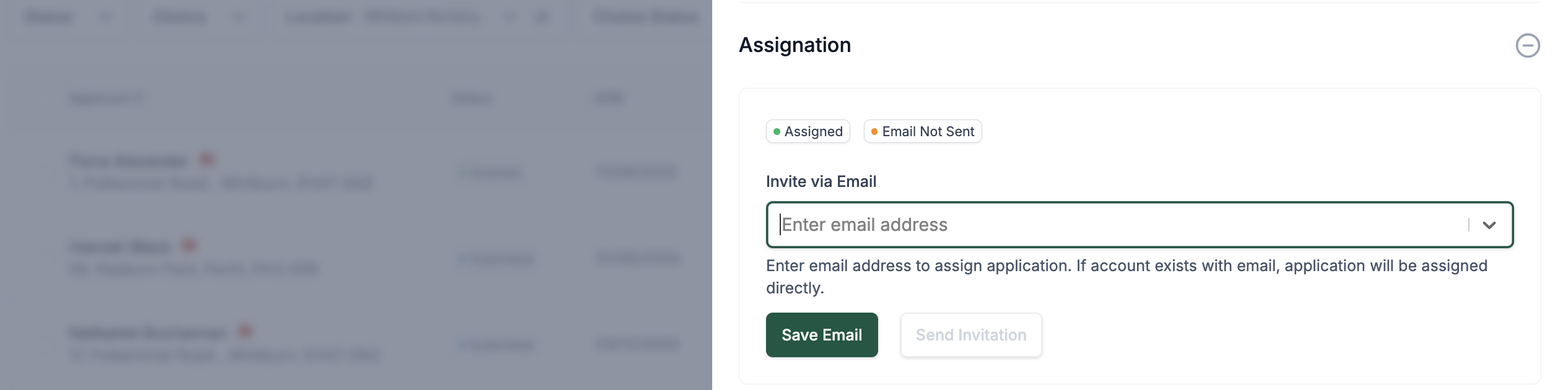
The platform provides an Assignation functionality that allows staff to manually assign an application to a parent or carer.
- Where to Find It:
- Open the child’s application.
- In the Quick View Menu, locate the Assignation section.
- Process:
- Enter the parent/carer's email address. This field will come prefilled with the parent/carer's email used during submission.
- To use an alternative email: reset it by pressing 'X' and enter a new email. Once the new email is entered, confirm by clicking Create to add it to the application.
- Send an invitation.
- Once accepted, the parent/carer will have ownership and management rights over the application.
- Enter the parent/carer's email address. This field will come prefilled with the parent/carer's email used during submission.
This allows for a smooth transition where previously created applications can be securely linked to a parent or carer account.